
































































































































































How to Relieve Eye Strain From Screens: 7 Evidence-Based Daily Habits
Author: RVLNSV PRASAD
Updated On: September 2026
About Us
Author Bio
Editorial Policy
Contact Us

Introduction
If your eyes feel tired, dry, irritated, blurry, or heavy after working on a computer or scrolling on your phone, you are not alone. Long periods of screen use can contribute to digital eye strain, also called computer vision syndrome.
The good news is that many people can improve their comfort by changing how they use screens rather than relying on complicated treatments.
The most useful steps are surprisingly practical. Take regular distance breaks, blink deliberately, reduce glare, position your screen properly, make text easier to read, manage dry air, and check whether you need an updated vision prescription.
The important point is that eye strain is a symptom, not a single disease. Screen use can be one contributor, but uncorrected vision problems, dry-eye symptoms, poor lighting, prolonged close-up work, headaches, and other factors can also play a role. The American Optometric Association’s guidance on computer vision syndrome describes digital eye strain as a group of eye and vision-related problems associated with prolonged digital-device use.
This guide explains how to relieve eye strain from screens using practical habits supported by current eye-care guidance and recent research.
Quick Answer: How Can You Relieve Eye Strain From Screens?
Start with these seven habits:
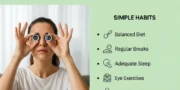
- Follow the 20-20-20 rule during prolonged screen work.
- Blink more deliberately instead of staring continuously.
- Keep your monitor roughly an arm’s length away and position it appropriately.
- Reduce glare and reflections.
- Increase text size and adjust brightness and contrast for comfortable viewing.
- Take longer breaks from close-up screen work throughout the day.
- Address dry air, sleep problems, and uncorrected vision rather than assuming every symptom is caused by the screen.
These approaches are consistent with the Mayo Clinic’s current eyestrain treatment and self-care guidance.
Key Takeaways
- Digital eye strain can cause tired, burning, dry, or watery eyes, blurred vision, and headaches.
- Screen use is not necessarily the only reason your eyes hurt.
- Regular distance breaks can reduce the visual demand of prolonged near work.
- Blinking matters because concentrated screen viewing can reduce normal blinking.
- Glare, poor screen position, and tiny text can make screen work harder.
- Artificial tears may help some people with dry-eye symptoms.
- Blue-light filtering glasses should not be presented as a proven treatment for digital eye strain.
- Persistent pain, vision changes, or symptoms that do not improve with self-care deserve an eye examination.
What Is Digital Eye Strain?
Digital eye strain refers to eye and vision symptoms associated with prolonged use of computers, smartphones, tablets, and other digital displays.
Common symptoms include:
| Symptom | What you may notice |
|---|---|
| Tired eyes | Eyes feel heavy after screen work. |
| Dryness | Gritty or uncomfortable feeling |
| Burning | Stinging or burning sensation |
| Watery eyes | Eyes water after prolonged viewing. |
| Blurred vision | Text or distant objects may temporarily look unclear. |
| Headache | May develop after prolonged visual work |
| Light sensitivity | Bright light may feel uncomfortable. |
| Neck or shoulder discomfort | May accompany prolonged computer work |
The American Optometric Association’s information on computer vision syndrome lists symptoms such as eyestrain, headaches, blurred vision, dry eyes, and neck or shoulder discomfort among problems associated with prolonged computer use.
Mayo Clinic also describes tired, burning, itching, dry, or watery eyes, blurred or double vision, headaches, and difficulty concentrating as possible eyestrain symptoms. (Mayo Clinic)
Why Do Screens Make Your Eyes Feel Tired?
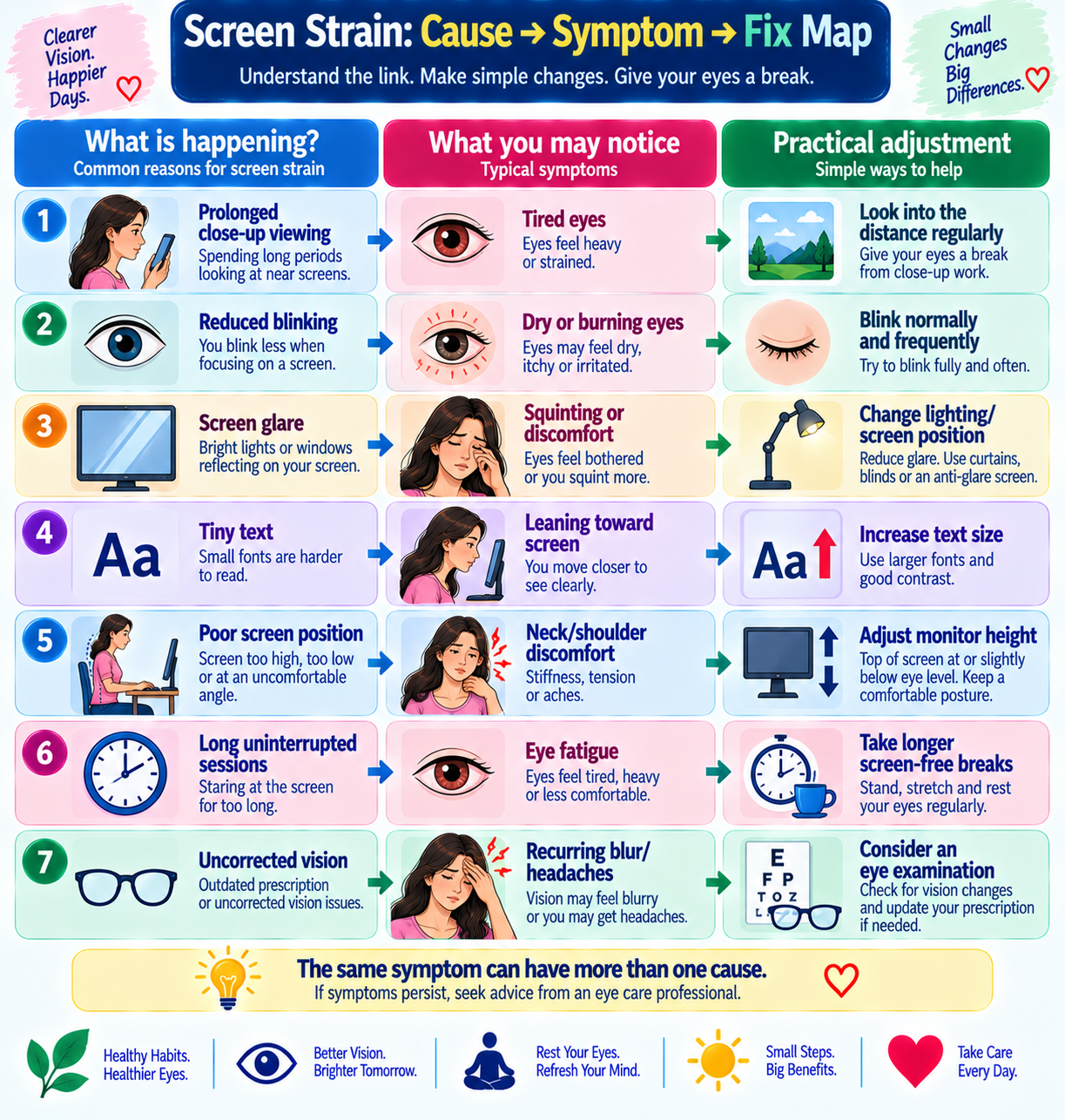
Your eyes continuously adjust while you read small text, follow moving images, and shift attention across a display.
At the same time, concentrated screen viewing can change normal blinking behavior. Less frequent blinking can contribute to ocular-surface discomfort and dryness.
Glare and reflections create another problem. If the screen is difficult to see clearly, you may squint, lean closer, or maintain a fixed visual posture for longer.
The viewing distance matters too. A screen that is too close or text that is too small can make prolonged visual work less comfortable.
A recent 2026 integrative review examined 128 studies and described digital eye strain as a multifactorial problem involving ocular-surface and blink dynamics, focusing and eye coordination, musculoskeletal load, optical factors, and cognitive workload. The full review is available through PubMed.
That is why there is no single “natural cure” that works for everyone.
7 Ways to Relieve Eye Strain From Screens
1. Use the 20-20-20 Rule
The 20-20-20 rule is one of the easiest habits to add to a computer-heavy day.
Every 20 minutes, look at something about 20 feet away for at least 20 seconds.
The purpose is simple. Instead of keeping your eyes focused continuously at one near distance, you briefly shift your attention to something farther away.
The National Eye Institute recommends 20-20-20 breaks for people who spend substantial time looking at screens. Mayo Clinic also recommends regular breaks and looking away from the screen during close work. (Mayo Clinic)
You do not need a special device.
A simple reminder on your computer or phone can help establish the habit.
People-first tip: If you forget every 20 minutes, do not abandon the idea. Start by taking a distance-viewing break whenever you finish a major task, email batch, meeting, or work section.
Consistency is more realistic than trying to follow a perfect schedule.
2. Blink More Deliberately
Blinking is easy to overlook because it normally happens automatically.
During concentrated screen work, however, people may blink less frequently or less completely. This can contribute to an unstable tear film and dry-eye symptoms.
Mayo Clinic specifically recommends blinking often during computer work because blinking helps keep the eyes lubricated.
Try this simple habit:
Before starting a long screen task, take a few normal, complete blinks.
During concentrated reading, relax your face occasionally and blink naturally several times.
During video calls, avoid staring continuously at your own image.
The goal is not to force hundreds of exaggerated blinks. It is to avoid becoming so absorbed in the screen that you barely blink.
3. Fix Your Screen Position
Your screen position can make a bigger difference than many people realize.
A practical workstation check looks like this:
| Check | What to look for |
|---|---|
| Distance | Roughly an arm’s length for a typical desktop monitor |
| Height | Top of the screen around eye level or slightly below |
| Position | Screen directly in front of you |
| Text | Large enough to read without leaning forward |
| Chair | Adjusted so you can work without hunching |
| Documents | Positioned to reduce repeated head and eye movement |
Do not force yourself into an uncomfortable “perfect” posture.
The aim is to create a setup that lets you see clearly without repeatedly leaning toward the screen.
If you regularly move your head closer because text looks blurry, consider whether you need a vision examination rather than simply increasing screen brightness.
4. Reduce Glare and Reflections
A bright window behind your monitor, overhead lighting reflected on the screen, or a shiny display can make comfortable viewing more difficult.
Mayo Clinic recommends adjusting lighting and reducing glare as part of eyestrain management.
Try these simple changes:
- Move the monitor away from direct window reflections.
- Adjust blinds or curtains when sunlight hits the screen.
- Turn down unnecessarily bright overhead lighting.
- Change the screen angle if reflections are visible.
- Clean the monitor regularly.
- Use comfortable contrast and brightness settings.
You do not need a dark room.
The goal is comfortable, balanced lighting, not maximum darkness.
A Simple Glare Test
Sit normally at your desk.
Look at the screen from your usual working position.
If you can clearly see a window, lamp, or bright reflection across the area where you read, change the position of either the light source or the screen.
This takes less than a minute and may be more useful than buying another eye-care product.
5. Make Text Easier to Read
One of the most overlooked ways to reduce screen eye strain is to stop making your eyes work unnecessarily hard to read.
If you regularly squint or lean forward, increase the text size.
You can also adjust:
- Font size
- Screen brightness
- Contrast
- Browser zoom
- Display scaling
- Document magnification
This is especially useful on smaller laptop screens and smartphones.
A larger font is not a sign of weak eyesight.
If larger text makes reading easier, use it.
6. Take Longer Breaks From Close-Up Work
The 20-20-20 rule provides frequent short breaks, but it should not become an excuse to stare at screens continuously for the rest of the day.
Whenever possible, include longer periods away from close-up digital work.
For example, after finishing a long work session, stand up, walk around, talk to someone, prepare a drink, or look outside rather than immediately switching from your computer to your phone.
This creates a genuine break from near-screen viewing.
A systematic review of digital eye strain in young screen users found that longer screen exposure and poor ergonomic factors were associated with greater symptoms. The review also found insufficient evidence that blue-light-blocking filters prevent digital eye strain. Read the systematic review on PubMed.
The practical lesson is important:
Do not focus only on what is in front of your eyes. Pay attention to how long you stay there.
7. Manage Dry Air and Underlying Vision Problems
Sometimes your screen is only part of the problem.
Air conditioning, fans, and dry indoor environments can contribute to eye dryness. Mayo Clinic recommends improving air quality and avoiding air blowing directly toward the eyes.
Try moving a fan or air-conditioner vent so that air is not blowing directly across your face.
Most importantly, do not assume every recurring symptom is caused by screen time.
Uncorrected or undercorrected vision problems can contribute to digital eye strain. The American Optometric Association explains the role of vision problems and computer-related visual symptoms.
If your eyes continue to hurt despite improving your screen habits, an eye examination may reveal a problem that lifestyle changes alone cannot fix.
Natural Remedies for Eye Strain: What Actually Helps?
The phrase “natural remedies for eye strain” is popular, but it needs some clarification.
Many online articles make eye strain sound as though a particular food, tea, supplement, or homemade remedy can “heal” tired eyes.
That is not a good way to understand digital eye strain.
The most useful natural approaches are usually behavioral and environmental habits.
Helpful Natural Habits
- Taking regular distance breaks
- Blinking normally and frequently
- Reducing glare
- Improving screen position
- Increasing text size
- Taking longer breaks from close-up work
- Avoiding direct airflow toward the eyes
- Getting adequate rest
- Spending time away from continuous near-screen tasks
These approaches are more practical than looking for a single miracle ingredient.
Mayo Clinic notes that some natural products, including omega-3 fatty acids, may help some eyestrain symptoms but also states that more research is needed. See Mayo Clinic’s discussion of natural products for eyestrain.
That distinction is important.
What About Eye-Healthy Foods?
A balanced diet supports overall eye health, but food should not be presented as a quick treatment for screen-related eye strain.
Useful nutrients for overall eye health include vitamin A, vitamin C, vitamin E, zinc, and carotenoids such as lutein and zeaxanthin.
Good food choices can include:
| Nutrient or food component | Food examples | Practical role |
|---|---|---|
| Vitamin A | Eggs, dairy, orange vegetables | Supports normal vision |
| Lutein and zeaxanthin | Leafy greens, eggs | Important nutrients for eye health |
| Vitamin C | Citrus fruits, guava, peppers | Antioxidant nutrient |
| Vitamin E | Nuts and seeds | Antioxidant nutrient |
| Omega-3 fats | Fatty fish, some plant sources | Important dietary fats |
The key is not to promise that eating carrots or spinach will immediately remove screen fatigue.
Your eyes benefit from an overall nutritious diet, while screen-related discomfort usually requires attention to viewing habits, breaks, environment, and vision correction.
The 5-Minute Eye-Strain Audit
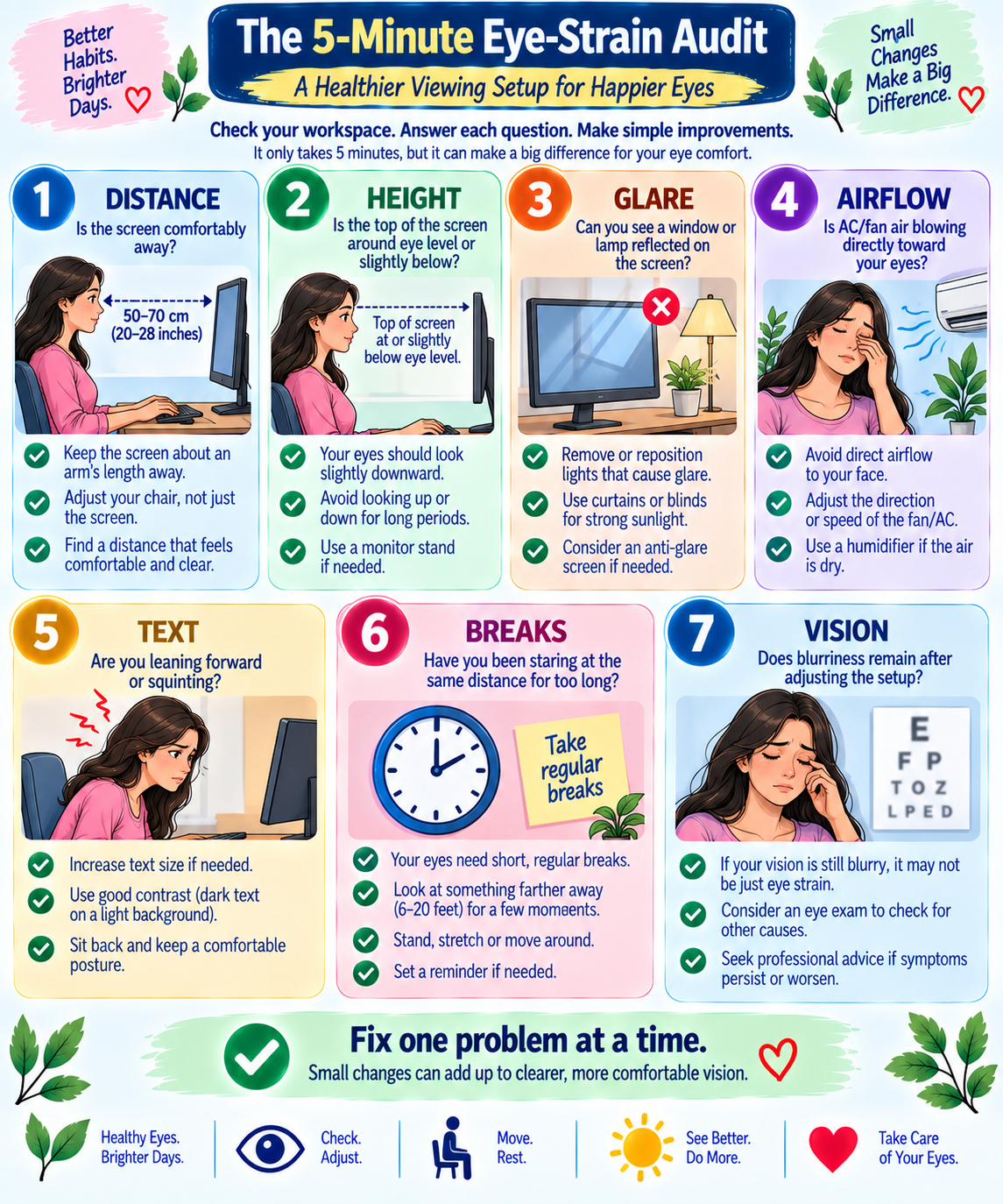
This is a simple practical check you can do at home or work.
Step 1: Check the Distance
Is your monitor extremely close?
Move it back to a comfortable working distance rather than leaning toward the screen.
Step 2: Check the Height
Is the monitor positioned so high that you constantly look upward?
Adjust it so the top of the display is around eye level or slightly below, consistent with Mayo Clinic’s workstation guidance.
Step 3: Check Glare
Look carefully at the screen.
Can you see a window, lamp, or bright reflection across the reading area?
Change the position of the light or screen.
Step 4: Check Airflow
Can you feel air from a fan or air conditioner blowing directly across your eyes?
Redirect it.
Step 5: Check Your Text Size
Are you leaning forward or squinting to read?
Increase the font size or display scaling.
Step 6: Check Your Breaks
Have you been staring at the same near distance for an hour?
Start using regular distance breaks.
Step 7: Check Your Vision
If text remains blurry even after improving the setup, do not simply keep increasing the zoom.
Consider an eye examination.
This audit brings together practical factors addressed in professional eyestrain guidance but presents them as a simple checklist that people can use at their desks. (Mayo Clinic)
Why Your Eyes May Still Hurt Even After Following the 20-20-20 Rule
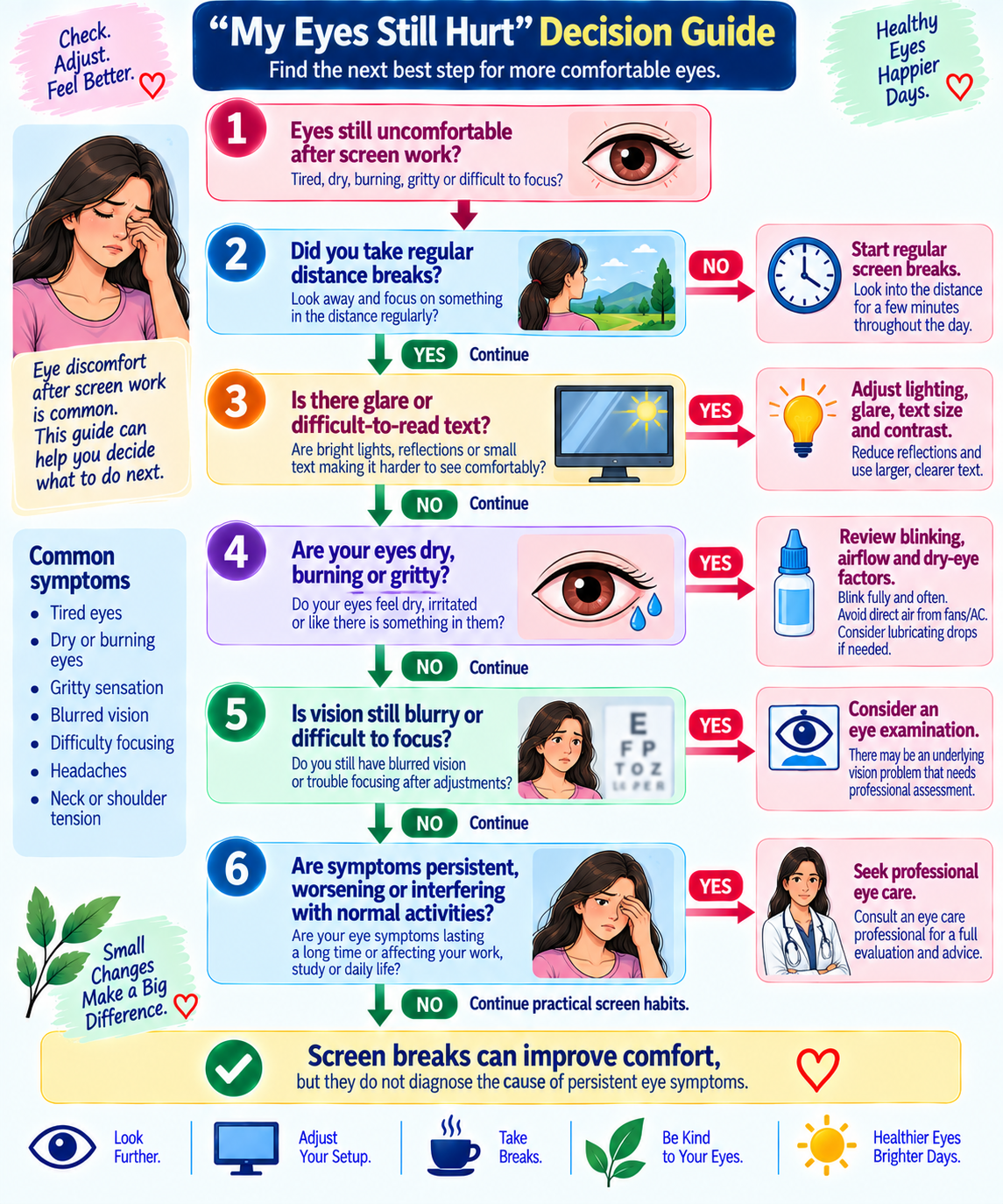
The 20-20-20 rule is useful, but it is not a diagnostic test.
If your eyes still hurt, consider other contributors.
You May Need Updated Glasses
An outdated prescription can make prolonged screen work uncomfortable. Mayo Clinic notes that some people benefit from glasses prescribed specifically for computer or reading tasks. (Mayo Clinic)
You May Have Dry-Eye Disease
Screen-related dryness and chronic dry-eye disease are not necessarily the same thing.
Your Screen May Still Be Too Difficult to Read
Tiny text, poor contrast, or glare can continue to create visual difficulty even when you take breaks.
Your Workspace May Be Poorly Set Up
Your eyes and body work together during desk tasks.
A poorly positioned monitor can contribute to neck and shoulder discomfort as well as visual fatigue.
You May Be Spending Too Much Time at Near Distance
A short break every 20 minutes does not replace a meaningful break from prolonged close-up work.
Another Condition May Be Responsible
Headaches, persistent blurred vision, eye inflammation, and other problems can sometimes be mistaken for ordinary eye strain.
Do Blue-Light Glasses Really Prevent Eye Strain?
This is one of the most common questions.
Blue-light filtering glasses are frequently marketed as a solution for digital eye strain. However, the evidence does not support presenting them as a proven cure or essential treatment.
A systematic review found that blue-light-blocking filters did not appear to prevent digital eye strain in the studies evaluated. The full review is available on PubMed.
A separate Cochrane systematic review found that blue-light-filtering spectacle lenses may have little or no short-term effect on computer-related eye strain compared with non-filtering lenses. See the Cochrane review indexed in PubMed.
A 2026 review also concluded that evidence for meaningful improvement in visual fatigue from blue-light-filtering lenses remains inconclusive. Read the updated 2026 review on PubMed.
A better strategy is therefore to first address factors with clearer practical relevance:
- Screen breaks
- Blinking
- Glare
- Screen distance
- Screen height
- Text size
- Vision correction
- Dry indoor air
If you like a particular pair of glasses for comfort, that is different from claiming that the lenses prevent digital eye strain.
Common Mistakes That Can Make Eye Strain Worse
Mistake 1: Turning the Brightness All the Way Up
A brighter screen is not automatically easier to view.
Adjust brightness to a level that feels comfortable in your environment.
Mistake 2: Working in Complete Darkness
You do not need to sit in a dark room to protect your eyes.
Aim for comfortable ambient lighting and reduced glare.
Mistake 3: Ignoring Blurry Vision
If you constantly enlarge the text because your normal viewing distance looks blurry, consider whether your prescription needs checking.
Mistake 4: Treating Every Dry Eye With Random Eye Drops
Artificial tears can help some people, but not every eye drop is appropriate for every situation.
Mistake 5: Believing One Supplement Will Fix the Problem
Supplements should not replace better screen habits or an eye examination when needed.
Mistake 6: Switching From a Computer to a Phone During Every Break
If the goal is to rest from close-up screen work, immediately opening your phone may not provide much of a break.
Mistake 7: Ignoring Persistent Symptoms
Repeated discomfort deserves attention rather than endless experimentation with home remedies.
A Simple Screen-Friendly Daily Routine
You do not need to completely eliminate screens.
Try this practical routine instead.
Before work
Check your monitor position, text size, and lighting.
During computer work
Blink normally and use regular distance breaks.
Every 20 minutes
Look away from the screen for about 20 seconds, following the 20-20-20 approach recommended by the National Eye Institute.
Every few hours
Take a longer break from close-up digital work.
During breaks
Stand up, walk around, or look into the distance rather than automatically switching to another screen.
In an air-conditioned room
Make sure cold or dry air is not blowing directly toward your eyes.
At the end of the workday
Give yourself some genuine screen-free time instead of immediately moving from the computer to your phone.
This approach is more sustainable than trying to follow a complicated eye-care routine.
Latest Research Developments in Digital Eye Strain
Research published in recent years has moved toward a broader understanding of digital eye strain.
A 2026 integrative review examined 128 studies and described digital eye strain as a cross-system condition involving ocular-surface and blink dynamics, accommodation and eye coordination, musculoskeletal load, optical stress, and cognitive load. The full 2026 review is available through PubMed.
This is an important development because two people can use screens for the same number of hours and experience very different symptoms.
One person may mainly have dry eyes.
Another may have headaches associated with an uncorrected prescription.
Someone else may have neck discomfort related to workstation positioning.
Research is therefore moving toward a more useful question:
Not simply “How many hours are you on a screen?” but “What are you doing, how are you viewing it, and what symptoms are you experiencing?”
A 2026 systematic review and meta-analysis also examined the relationship between screen exposure and digital eye strain. Because much of this type of evidence is observational, associations should not automatically be interpreted as proof that screen exposure directly caused every symptom. The research is available through PubMed.
Earlier systematic review evidence also found associations between longer screen exposure, poor ergonomics, and digital eye-strain symptoms in young users. Read the review on PubMed.
When Should You See an Eye Doctor?
Most ordinary eyestrain improves after reducing the visual workload and addressing contributing factors.
However, do not assume persistent symptoms are harmless.
Arrange an eye examination if:
- Eye discomfort continues despite self-care.
- Blurred vision keeps returning.
- You develop persistent headaches during visual work.
- You have difficulty seeing clearly even after adjusting the screen.
- Symptoms interfere with work or normal activities.
- You have ongoing dry-eye symptoms.
- Your vision changes unexpectedly.
Sudden or severe vision changes, significant eye pain, a serious eye injury, or other acute eye symptoms require prompt medical attention rather than home remedies.
Can Eye Strain Cause Headaches?
Yes, headaches can occur with eyestrain.
Digital eye strain commonly includes headaches along with tired eyes, blurred vision, and dryness. The American Optometric Association’s computer vision syndrome guidance discusses headaches among symptoms associated with prolonged digital-device use.
However, not every headache associated with screen use is caused by eye strain.
If headaches are frequent, severe, or new or accompanied by significant vision changes or neurological symptoms, seek appropriate medical evaluation.
Can Eye Strain Cause Permanent Eye Damage?
Ordinary eyestrain is generally temporary and often improves after resting the eyes and addressing contributing factors.
Mayo Clinic explains that eyestrain is usually not serious, although symptoms can sometimes indicate an underlying eye condition that needs treatment.
This is why the goal should not be to panic about every hour spent on a computer.
Instead, build healthier screen habits and pay attention to symptoms that do not behave like ordinary temporary fatigue.
Frequently Asked Questions
What is the fastest way to relieve eye strain from screens?
The simplest immediate step is to stop looking closely at the screen and look into the distance for a short period. You can also blink normally, reduce glare, and make the screen easier to read. These approaches are consistent with Mayo Clinic’s eyestrain self-care recommendations.
Does the 20-20-20 rule really help?
The 20-20-20 rule is recommended as a practical way to introduce regular distance breaks during screen use. The National Eye Institute specifically recommends this approach.
Are natural remedies for eye strain safe?
Simple habits such as taking breaks, blinking, reducing glare, and adjusting your workstation are generally low-risk for most people. Supplements and eye drops are different and should not automatically be assumed to be appropriate for everyone.
Can drinking more water cure screen-related dry eyes?
Staying adequately hydrated is part of general health, but drinking extra water should not be presented as a standalone cure for digital eye strain. Persistent dryness may require evaluation for dry-eye disease or another cause.
Should I buy blue-light glasses?
They are not necessary to claim protection from digital eye strain. Current evidence does not establish blue-light filters as a proven method for preventing digital eye strain. A Cochrane systematic review found little or no short-term effect on computer-related eye strain.
Is looking at a phone worse than looking at a computer?
Not necessarily. Important factors include viewing distance, duration, text size, glare, posture, blinking, and the type of visual task.
Can eye strain cause blurred vision?
Temporary blurred vision can occur with eyestrain. However, recurring or persistent blurred vision should be evaluated rather than automatically attributed to screen use. Mayo Clinic includes blurred vision among possible eyestrain symptoms.
How often should I take screen breaks?
The 20-20-20 rule is a useful starting point: every 20 minutes, look about 20 feet away for at least 20 seconds. The National Eye Institute provides this recommendation for screen users.
Research Methodology
This article was prepared using current guidance from major medical and professional eye-health organizations and recent peer-reviewed research.
The evidence review focused on digital eye strain, computer vision syndrome, screen-related symptoms, blinking, screen breaks, workstation ergonomics, glare, dry-eye symptoms, and current evidence concerning blue-light filtering.
Priority was given to medical organizations and peer-reviewed literature rather than commercial eye-care product pages.
The recommendations are intended to provide practical health information and are not a substitute for an individual eye examination.
Author Note
This article focuses on practical steps that ordinary screen users can realistically apply at home, at work, or while studying.
The goal is not to make screen users afraid of technology. Computers, smartphones, and tablets are part of modern life, and completely avoiding them is unrealistic for many people.
A better approach is to make screen use more comfortable, take regular breaks, and recognize when symptoms may require professional attention.
Medical Disclaimer
This article is for general educational purposes only. It does not diagnose, treat or cure eye disease.
Eye strain can have several causes, including digital-device use, uncorrected vision problems, dry-eye disease, and other conditions. If you have persistent eye pain, ongoing blurred vision, significant vision changes, or symptoms that do not improve with self-care, consult an optometrist or ophthalmologist.
Do not start supplements or medicated eye drops based only on information in this article. A qualified healthcare professional can help determine what is appropriate for your individual situation.
Fitness Disclaimer
The movement and break suggestions in this article are general wellness recommendations rather than a personalized exercise program.
If you have a medical condition, significant pain, dizziness, balance problems, or another health concern, speak with an appropriate healthcare professional before changing your physical activity routine.
Conclusion
Knowing how to relieve eye strain from screens does not require an expensive gadget or complicated routine.
Start with the basics.
Take regular distance breaks. Blink normally. Make text easier to read. Reduce glare. Position your monitor comfortably. Avoid direct airflow toward your eyes. Give yourself genuine breaks from close-up screen work.
At the same time, remember that screen use is only one possible contributor to eye discomfort.
If your eyes remain painful, your vision stays blurry or symptoms keep returning despite better screen habits, do not keep adding home remedies indefinitely. An eye examination may identify a prescription problem, dry-eye disease, or another condition that needs attention.
The most useful approach is therefore simple: make your screen environment easier on your eyes, give your visual system regular breaks, and take persistent symptoms seriously.
Primary medical sources
- Mayo Clinic—Eyestrain: Diagnosis and Treatment—screen breaks, 20-20-20, blinking, glare, monitor position, text size, artificial tears, airflow, eyewear, and when to seek an eye examination.
- Mayo Clinic—Eyestrain: Symptoms and Causes—symptoms such as tired, dry or burning eyes, blurred vision, and headaches and causes of eyestrain.
- National Eye Institute—Keep Your Eyes Healthy—20-20-20 screen-break recommendation and general eye-health guidance.
- National Eye Institute—Digital Eye Strain and Screen-Time Tips—current NEI material specifically addressing screen use and the 20-20-20 approach.
- National Eye Institute—Dry Eye—dry-eye symptoms, screen breaks, avoiding smoke/wind/air conditioning, humidification, hydration, and sleep.
- American Optometric Association—Computer Vision Syndrome—digital eye-strain symptoms, computer use, and vision-related factors.
Recent research
- 2026 PubMed—Integrative Review of Digital Eye Strain, 128 Studies—current research on blinking, ocular surface, accommodation, eye coordination, posture, optical factors, and cognitive workload.
- PubMed—Digital Eye Strain in Young Screen Users: Systematic Review—evidence concerning screen exposure, ergonomics, and digital eye-strain symptoms.
- PubMed—Blue-Blocking Filters and Digital Eye Strain—clinical trial evidence that blue-blocking filters did not reduce digital eye-strain signs and symptoms.
- PubMed—Cochrane Review of Blue-Light-Filtering Lenses—evidence concerning blue-light-filtering spectacle lenses and computer-related eye strain.
Additional supporting source
Related Content
- 8 Top Superfoods for a Balanced and Healthy Diet
- Category Holistic wellness
- 7 Natural Ways to Reduce Anxiety and Stress Daily: A Comprehensive Guide